
Admin users can configure Project Types to control how time is logged. They can restrict individual contributors from logging time directly against a Project or Milestone, encouraging them to select a more appropriate object when creating a work log or message.
Additionally, Admins can prevent time from being logged on Projects whose status maps to a completed standing, ensuring no further time is recorded once a Project is effectively complete.
Using Time Logging Controls
1: From Settings → Projects → Types, Progressions & Fields edit the Type of Project you want to apply the Time Logging Controls to.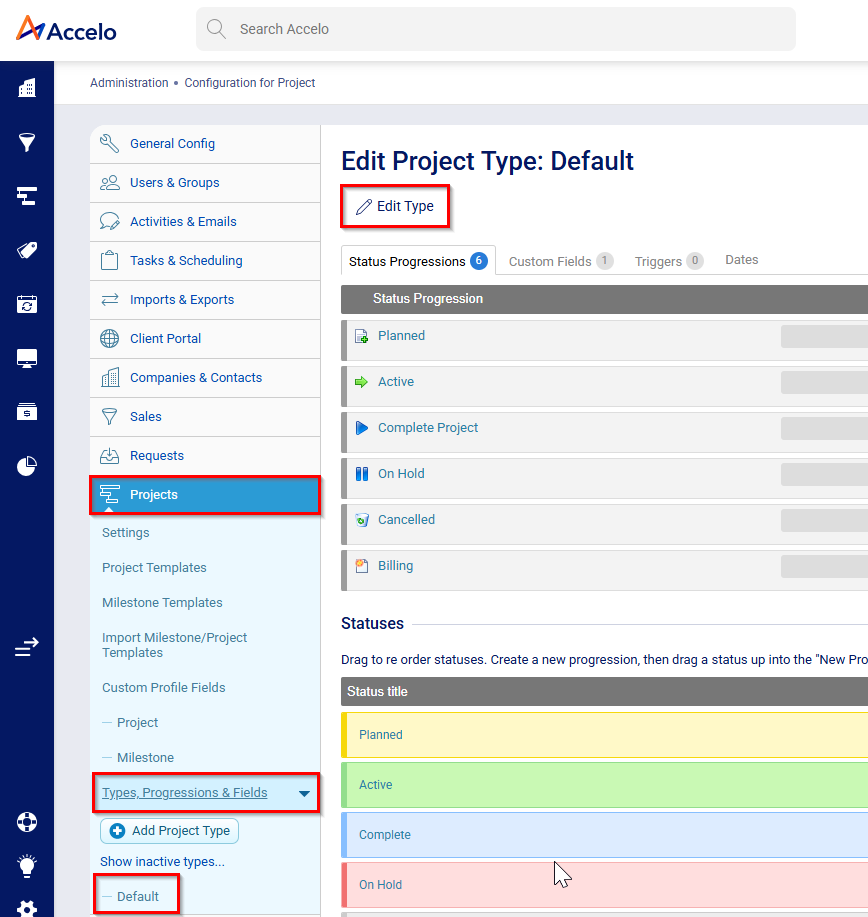
2: There will be 3 toggles:
- Block time logging on complete project standing
- Block time logging directly against project
- Block time logging directly against milestones
Toggle on all 3 to ensure users can only log time directly against a Task on active Projects only.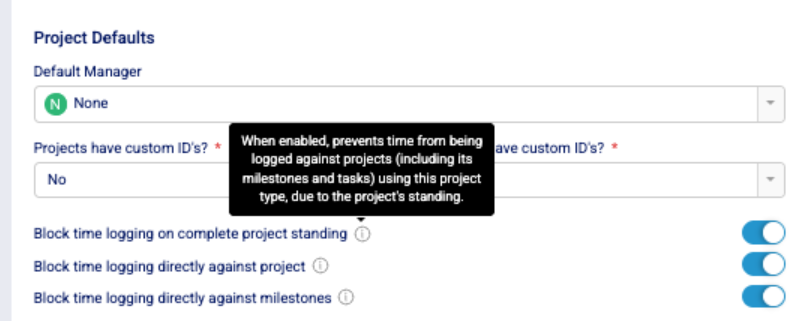
Applying the controls – Creating or Editing a Project
When a Project is created, the Project inherits the time-logging control settings associated with that Project Type.
Note: Changes to time-logging controls on a Project Type only apply to Projects that are newly created. Existing Projects that already use the Type will cannot be updated to use them.