
HubSpot is a powerful, incredibly customizable system with numerous products and product-levels. The ability to customize sales pipeline records extensively, and the dynamic nature of some fields (ie, the last time the lead visited your website) makes for a complex array of information that needs to sync between Accelo and HubSpot.
Accelo's HubSpot Deals integration syncs your deals accurately by mapping the information in your HubSpot account to Accelo in two key areas:
- Fields - Map your standard and customized properties in HubSpot to their counterparts in Accelo.
- Status Mapping - Map your deal stages in HubSpot to their corresponding status in Accelo.
Click here to understand all the fields that sync between Accelo and HubSpot.
Field Mapping
The first concept to cover is Field Mapping. This is where you're able to map HubSpot properties to Accelo fields. There are a number of standard field mappings (title, amount and stage for example), but most properties are able to be mapped into any Accelo custom field you like.
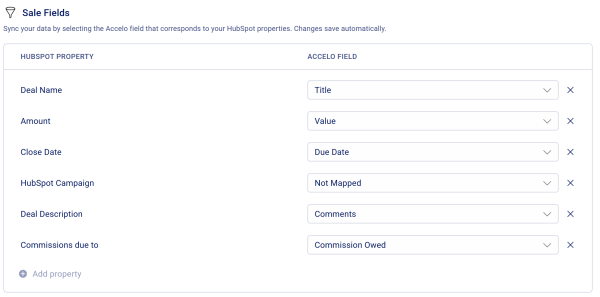
Your Accelo custom fields should be created before you begin mapping. For more information on how to create custom fields, check out Accelo's documentation on Profile Fields.
Status Mapping
The second concept to cover is the mapping of your HubSpot stages to the corresponding Accelo status. Mapping your stages will ensure that your pipeline is reflected accurately when deals are synced.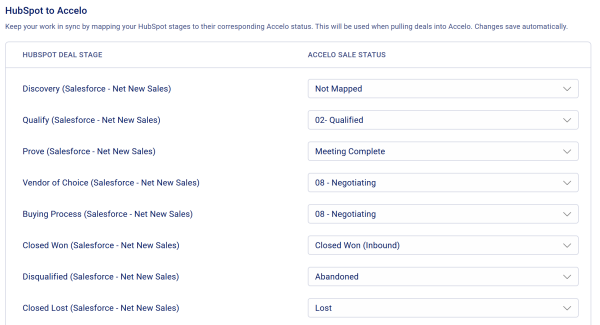
For new users, we recommend a one-to-one mapping of stages to statuses to ensure that the pipeline appears consistently in both systems. For more information on customizing your statuses in accelo, check out our guide.
For advanced users, multiple HubSpot stages can be mapped to a single Accelo status. This can be helpful in simplifying your delivery team's view of the pipeline by consolidating the fine details of the funnel. Similarly, multiple Accelo statuses can be mapped back to a single HubSpot stage since similarly, a good marketer may just need to know that someone is a client, and not necessarily all the details an account manager obsesses over.
How long does it take my information to sync between HubSpot and Accelo?
To ensure an accurate and up-to-date pipeline, the HubSpot Deals integration detects updates in real-time and aims to process them as quickly as possible. The time for these updates to be applied will vary depending on the number of updates being processed, but should range between a few seconds up to a maximum of ten minutes.
Understand all the fields that sync between Accelo and HubSpot
This table reflects the data points that are synced by the integration. These are synced in addition to the company and contact fields synced by the HubSpot CRM integration.
|
Accelo Field |
HubSpot Field |
|
Title |
Deal Name |
|
Value |
Amount |
|
Status |
Deal Stage |
|
Salesperson |
Deal Owner |
|
Related Company |
Associated Company (first added) |
|
Contact |
Associated Contact (first added) |
|
All other fields customizable |
All other fields customizable |